
Want to know how to access and link your Enjin Wallet to the Multiverse Dashboard? You are in the right place.
The next Enjin Multiverse has officially started. Additional details about the current season can be found in the blog post Enjin Multiverse Quest: Essence of the Elements.
Multiverse Dashboard
The Multiverse Dashboard displays key information about the ongoing Multiverse Quest and allows a wallet to be connected. By linking a wallet, progress can be tracked, new ways to earn Multiverse Essence can be discovered, and upcoming objectives can be planned.
The dashboard can be accessed directly from NFT.io: https://nft.io/
How to Link a Wallet
-
Start by visiting https://nft.io/ and clicking Multiverse in the upper-left corner of the page. This will redirect to the Multiverse page, where details about the current quest—Essence of the Elements—are shown, including the Multiverse Roadmap and available Rewards.
-
Select CONNECT WALLET to continue.
-
The following wallet options are available:
- Enjin Wallet via EnjinConnect (recommended)
- WalletConnect
- Polkadot.js
- SubWallet
-
Talisman
Note: If a wallet option is not visible, the corresponding browser extension may not be installed. Selecting the download button in the upper-right corner of a wallet option will redirect to the official download page for that extension.
- Depending on the wallet selected, a connection request pop-up may appear. Approve the request to complete the connection.
-
Once connected, the Multiverse Dashboard will load and display real-time progress along with available activities to earn Essence. In addition to that, the Essence NFT automatically mints on your wallet.
Navigating the Multiverse Dashboard
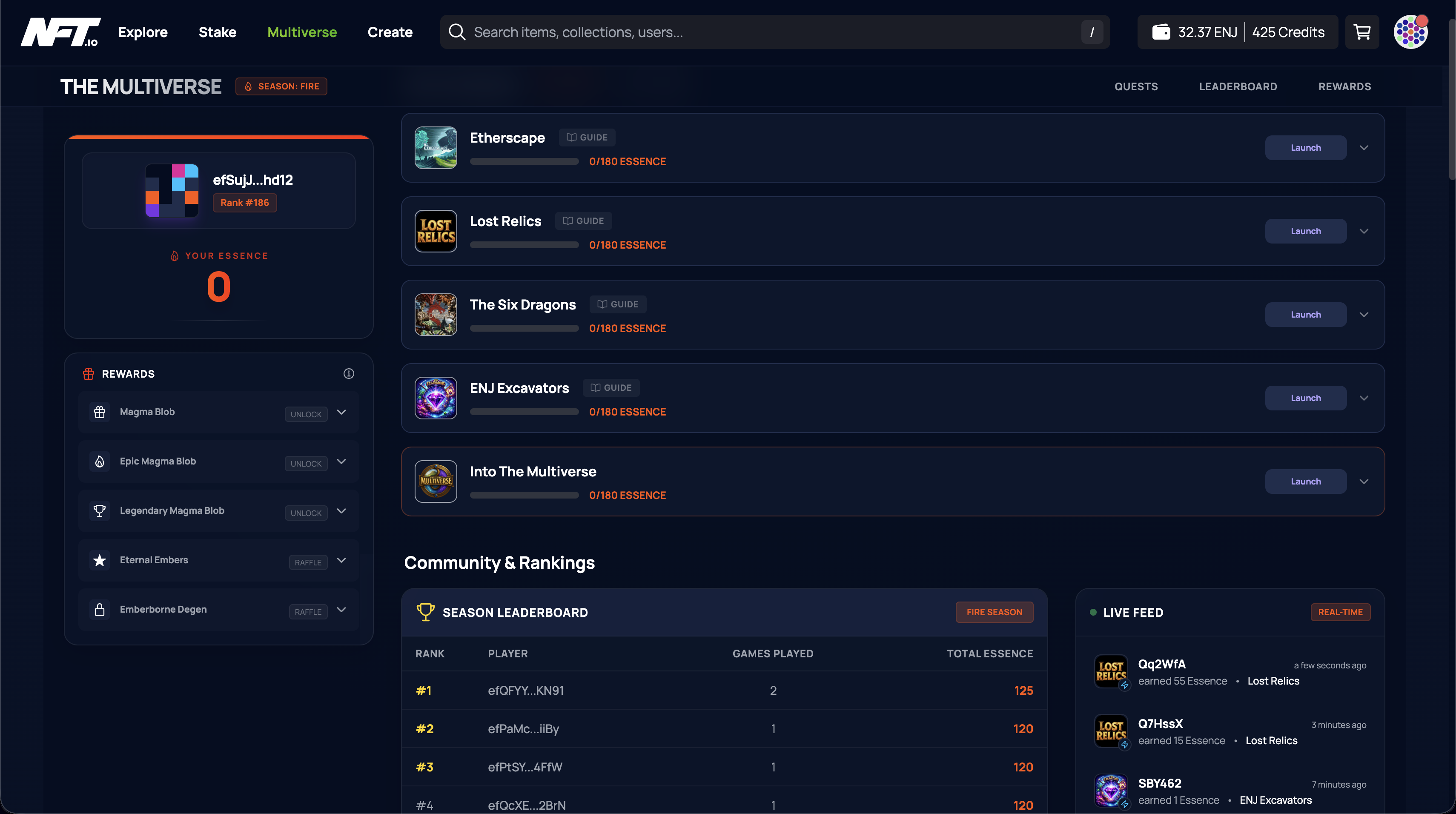
After a successful connection, the dashboard presents several sections:
- Wallet Details appear on the left side of the page and display the connected wallet address, current leaderboard rank, and total Multiverse Essence earned.
- Rewards are shown below the wallet details. These can be unlocked by earning Essence through gameplay. Rewards are distributed automatically at the end of the season.
- Active Quests list the games participating in the Multiverse. Selecting a game reveals the objectives required to earn Essence.
- Community Rankings provide a real-time leaderboard of players with the highest Essence earnings for the current season.
- Live Feed shows real-time Essence activity, including the game played, the amount of Essence earned, and when the activity occurred.
Connecting via Enjin Wallet
- To connect using the Enjin Wallet, the Enjin Wallet app must be installed on a mobile device. Please make sure to download the Enjin Wallet app only from official sources to ensure your security:
- Google Play Store for Android devices
- App Store for iOS devices
- You can also find the official download links directly on this page:
https://enjin.io/technology/wallet
-
Open the Enjin Wallet app and tap the QR icon in the upper-right corner. Scan the QR code displayed after clicking CONNECT WALLET on https://multiverse.nft.io/.
-
If multiple wallets exist within the Enjin Wallet app, a prompt will appear to select which wallet to connect like in the screenshot below. Make sure to select the wallet linked to the Multiverse games.
If only one wallet is available, it will be selected automatically and linked to the Multiverse Dashboard.
Once connected, gameplay can begin immediately. Participate in supported games, earn Essence, and unlock rewards available throughout the Multiverse season.
Need More Help?
For additional assistance, visit Enjin Support.
Comments
0 comments
Please sign in to leave a comment.